Note
Go to the end to download the full example code.
Interactive Tuning
Setup an interactive tuner for the amplifier matching network.
import rfnetwork as rfn
from pathlib import Path
import numpy as np
import matplotlib.pyplot as plt
import mpl_markers as mplm

# set matplotlib style
plt.style.use(rfn.DEFAULT_STYLE)

try:
    dir_ = Path(__file__).parent
except:
    dir_ = Path().cwd()

DATA_DIR = dir_ / "data/PD55008E_S_parameter"

# frequency range for plots
frequency = np.arange(350, 550, 5) * 1e6
f0 = 440e6 # design frequency

def smithchart_marker(ax, fc: float, **properties):
    """ place a smith chart marker by frequency rather than x/y position """

    f_idx = np.argmin(np.abs(frequency - fc))
    return mplm.line_marker(
        idx=f_idx, axes=ax, xline=False, yformatter=lambda x, y, idx: f"{frequency[idx]/1e6:.0f}MHz", **properties
    )

pa_8w = rfn.Component_SnP(
    file={
        150: DATA_DIR / "PD55008E_150mA.s2p",
        800: DATA_DIR / "PD55008E_800mA.s2p",
        1500: DATA_DIR / "PD55008E_1500mA.s2p"
    }
)

# 50 ohm microstrip model, substrate is from the amplifier evaluation board.
ms50 = rfn.elements.MSLine(
    h=0.030,
    er=2.55,
    w=0.08,
    df=0.017,
)
sphinx_gallery_thumbnail_path = ‘_static/img/tuning_window.png’
class pa_input(rfn.Network):
    """
    Amplifier input matching network
    """
    c1 = rfn.elements.Capacitor_pF(12, shunt=True)
    ms1 = ms50(1.1)
    c2 = rfn.elements.Capacitor_pF(40, shunt=True)
    ms2 = ms50(0.4)
    r1 = rfn.elements.Resistor(2)

    # Port 2 will connect to port 1 of the amplifer
    cascades = [
        ("P1", c1, ms1, c2, ms2, r1, "P2"),
    ]

    probes=True

class pa_output(rfn.Network):
    """
    PA output matching network
    """
    ms3 = ms50(0.4)
    c3 = rfn.elements.Capacitor_pF(65, shunt=True)
    ms4 = ms50(1.1)
    c4 = rfn.elements.Capacitor_pF(15, shunt=True)

    # Port 1 will connect to the amplifier output
    cascades = [
        ("P1", ms3, c3, ms4, c4, "P2"),
    ]

    # individual probes can be assigned here, but setting to True
    # creates a probe at every internal node of the network.
    probes=True


class pa_match(rfn.Network):
    """
    Matched amplifier circuit
    """
    m_in = pa_input()
    u1 = pa_8w(file=150)
    m_out = pa_output()

    cascades = [
        ("P1", m_in, u1, m_out, "P2"),
    ]

    probes=True

n = pa_match()

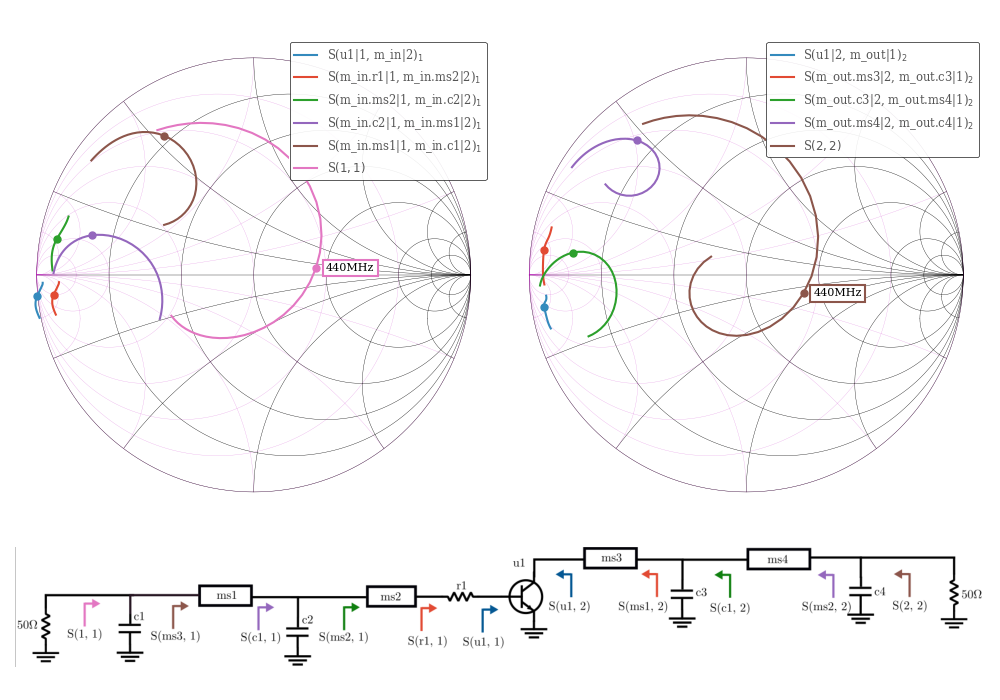
fig, axes = plt.subplot_mosaic(
    [["s11", "s22"], ["im", "im"]], figsize=(10, 7), height_ratios=[1, 0.3]
)

rfn.plots.draw_smithchart(axes["s11"])
rfn.plots.draw_smithchart(axes["s22"])

# use tune=True to link this plot with a tuner
lines1 = n.plot_probe(
    ("u1|1", "m_in|2"),
    ("m_in.r1|1", "m_in.ms2|2"),
    ("m_in.ms2|1", "m_in.c2|2"),
    ("m_in.c2|1", "m_in.ms1|2"),
    ("m_in.ms1|1", "m_in.c1|2"),
    input_port=1, fmt="smith", tune=True, axes=axes["s11"], frequency=frequency
)


ln_s11 = n.plot(11, fmt="smith", tune=True, axes=axes["s11"], frequency=frequency)

smithchart_marker(axes["s11"], f0, lines=lines1, ylabel=False)
smithchart_marker(axes["s11"], f0, lines=ln_s11)

lines2 = n.plot_probe(
    ("u1|2", "m_out|1"),
    ("m_out.ms3|2", "m_out.c3|1"),
    ("m_out.c3|2", "m_out.ms4|1"),
    ("m_out.ms4|2", "m_out.c4|1"),
    input_port=2, fmt="smith", tune=True, axes=axes["s22"], frequency=frequency
)

ln_s22 = n.plot(22, fmt="smith", tune=True, axes=axes["s22"], frequency=frequency)

smithchart_marker(axes["s22"], f0, lines=lines2, ylabel=False)
smithchart_marker(axes["s22"], f0, lines=ln_s22)

im = plt.imread(dir_ / "data/img/pa_tuning.png")
axes["im"].imshow(im)
axes["im"].set_axis_off()


fig.tight_layout()
Setup the tuner
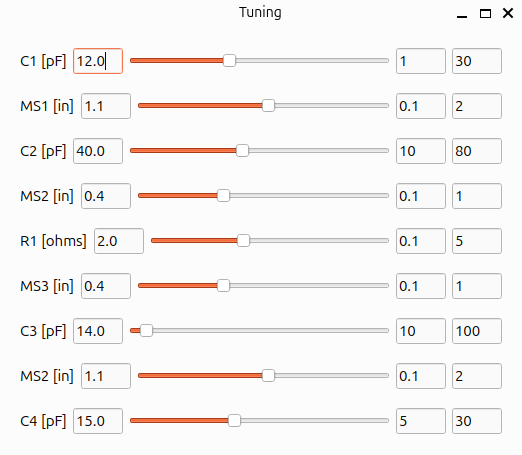
tuners = [
    dict(component="m_in.c1", variable="value", label="C1 [pF]"),
    dict(component="m_in.ms1", variable="length", label="MS1 [in]"),
    dict(component="m_in.c2", variable="value", label="C2 [pF]"),
    dict(component="m_in.ms2", variable="length", label="MS2 [in]"),
    dict(component="m_in.r1", variable="value", label="R1 [ohms]"),
    dict(component="m_out.ms3", variable="length", label="MS3 [in]"),
    dict(component="m_out.c4", variable="value", label="C3 [pF]"),
    dict(component="m_out.ms4", variable="length", label="MS2 [in]"),
    dict(component="m_out.c4", variable="value", lower=5, upper=30, label="C4 [pF]"),
]
# start the tuner (this is disabled for the readthedocs runner)
# n.tune(tuners)
plt.show()
Total running time of the script: (0 minutes 0.613 seconds)